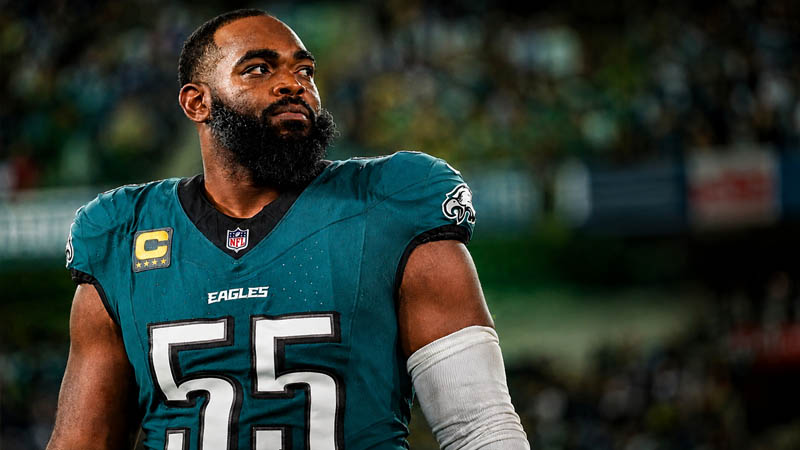
For any Philadelphia Eagles fan, the sight of Brandon Graham lining up at defensive end is a cornerstone of the Sunday experience. He is more than just a veteran; he is the emotional heartbeat of the defense and the hero of Super Bowl LII.
Naturally, when enthusiasts fire up Madden to lead the Birds to another championship, the expectation is that the roster reflects the real-world depth chart.
However, a recurring issue has surfaced within the community: Brandon Graham is occasionally missing from the Philadelphia Eagles’ roster in Franchise Mode. This absence can derail the immersion of a simulation and leave defensive rotations thin.
Understanding why this happens and how to rectify it requires a look into how digital rosters are managed and updated by developers.
The Technical Reality: Why Players Are Omitted
The digital representation of the NFL is a fluid environment. Unlike older generations of gaming where rosters were static upon the game’s release, modern iterations rely on “Live Content” systems.
When you find that Brandon Graham is missing, it is typically because the game’s internal database is reflecting real-life transitions that occur during the off-season or through specific retirement announcements.
1. Retirement Status and the Roster Sweep
One of the primary drivers for a player’s removal is their professional status in the real world.
Brandon Graham has previously discussed his retirement plans, and when such announcements are made, the development team at EA Sports often takes steps to remove or deactivate that player in standard active rosters.
These “roster sweeps” are designed to keep the game as current as possible for the general player base, but they can be frustrating for those who want to play with a specific veteran for one final season.
2. The Default Roster Trap
A common mistake made by players when starting a new Franchise journey is selecting the wrong database during the initial setup.
If you start a Franchise Mode while offline or if you choose to use the “Default” roster, the game pulls from an older, static database.
In these older versions of the file, Graham might have been omitted or unassigned because his contract status was in flux at the time that specific file was finalized.
3. Procedural Moves and the Free Agent Pool
In some instances, a player is not “deleted” from the game but is instead moved due to a procedural roster adjustment.
During the transition between different weeks of the season or during major roster updates, a player might be cut from their traditional team and placed into the general league-wide pool.
This means that while he is not on the Eagles’ depth chart, he is still technically available within the game’s ecosystem, just under a different category.
The Step-by-Step Restoration Guide
If you are looking at your screen and seeing a gap where a Super Bowl legend should be, do not delete your save just yet. There are several high-level fixes to bring Brandon Graham back into the fold.
Method 1: Utilizing Custom and Live Rosters
The most effective way to ensure your roster is accurate is to bypass the game’s internal “Default” settings. To do this, you must ensure your console or PC is connected to the EA servers.
When you begin a new Franchise Mode, the game will prompt you to choose between the “Default” roster or a “Custom/Live” roster.
Always select the Custom/Live Roster option. This forces the game to download the most recent weekly update provided by the developers, which often corrects errors regarding veteran availability and contract status that were present in the launch version of the game.
Method 2: Scouring the Free Agent Pool
If you have already invested hours into an existing Franchise and realized too late that Graham is missing, you should check the Free Agents list.
In many save files, Graham is sitting as an unsigned veteran because the game processed a roster move that removed him from the Eagles’ 53-man roster but kept him in the league.
To find him:
- Navigate to the Staff/Roster tab in your Franchise menu.
- Select Free Agents.
- Filter the search by position (Edge Rusher or Defensive End).
- Look for “Brandon Graham” in the list of available talent.
If he is there, you can simply sign him to a one-year veteran minimum deal to restore him to your active lineup.
The Importance of Roster Syncing
For the modern gamer, “Roster Sync” is a vital concept to master. Many players prefer to play “Offline” to avoid server lag or connection issues, but this prevents the game from communicating with the live database updates.
If you started your Franchise Mode without being connected to the internet, you are essentially playing with a “frozen” version of the league from months ago.
This is often why veterans like Graham, whose status might have changed during a specific week of the real-world NFL season, are missing.
By connecting to the servers before you initiate the “Start Franchise” command, you ensure that the game pulls the most comprehensive data available.
Expert Roster Management for Franchise Perfectionists
Maintaining a “Fortune 500” standard of gaming immersion requires more than just knowing the quick fixes. It requires an understanding of how to manage your digital assets effectively.
- Audit Your Files: Before starting a long-term Franchise, always go to the “Share Content” or “Roster Management” section of the main menu. Download the latest “Official Roster” and “Load” it into your active memory. This ensures that when you go to create a new save, the “Use Current Roster” option is pulling the most accurate data.
- Manual Edits: If the official updates are still missing a player you believe should be there, you can use the “Edit Roster” feature in the main menu to manually move players from Free Agency to their respective teams before starting your Franchise. This is a “fail-safe” method to ensure your favorite players are exactly where they belong.
- Community Rosters: Sometimes, the official developers move too slowly for the community’s liking. In the “Download Community Files” section, you can often find rosters curated by expert fans who manually add missing players, update equipment, and adjust ratings to match real-time performance.
The Psychological Impact of the Veteran Presence
In a simulation game, the presence of a player like Brandon Graham is not just about his “Power Move” or “Block Shedding” ratings. It is about the “Leadership” trait and the experience he brings to a young defensive room.
When a player is missing from the game, the simulation feels less like a reflection of the NFL and more like a generic sports product. By following the steps to restore these veterans, you are reclaiming the authenticity of the Eagles’ defensive identity.
Conclusion: Securing the Linc’s Defense
In the world of professional football simulation, every player counts. The absence of a legendary figure like Brandon Graham can leave a void in both your pass rush and your enjoyment of the game.
By understanding the nuances of roster syncing, the impact of real-world retirement status, and the utility of the Free Agent pool, you can ensure that your Philadelphia Eagles are at full strength.
Whether you are aiming for a perfect 17-0 season or just want to see #55 get one more sack in the playoffs, taking the time to manage your roster correctly is the hallmark of a world-class Franchise player.
Connect your console, download the live updates, and make sure the “Heart of Philly” is right where he belongs—on the field.